



Table of Contents
An accounting partner waiting on tax software access can’t serve a client while permissions sit in limbo. A retail manager can’t keep checkout moving when POS devices drop without a clear support path. A marketing team can’t launch on time when campaign tools, files, and user accounts don’t line up.
Rhianna Dahm, CRO at Level 4 MSSP Corp, notes: “Managed IT works when every ticket carries business context, who is waiting, which system is affected, and what risk must be checked before change happens.”
That’s why managed IT services matter in daily operations. Managed IT means the systems people use every day are supported, monitored, secured, and planned for under one accountable model, so tickets, access, applications, compliance needs, and threat prevention don’t fall between disconnected handoffs.
What Are Managed IT Services For Daily Business Operations
You need a clear operating model before comparing provider names or tool lists.
-
Predictable daily support: Employees submit tickets for laptop issues, printer problems, or mailbox errors and receive routed help without guessing which vendor owns the next step.
-
Monitored business systems: Servers, endpoints, cloud tools, and network connections are monitored for performance and security signals before a slow application delays invoices or customer handoffs.
-
Application and access help: A user who needs CRM access, tax software permissions, or campaign platform support gets a coordinated review instead of separate IT and security queues.
-
Security oversight included: In a model like MSSP One, device issues, login reviews, and risk monitoring stay connected, so support decisions don’t create preventable exposure.
Managed IT Services Definition In Plain Business Terms
A managed IT services definition should describe more than outsourced troubleshooting. It’s an ongoing model for keeping business technology usable, secure, recoverable, and aligned with the way work gets done. That includes help desk support, application managed services, endpoint monitoring, security review, vendor coordination, backups, continuity planning, and guidance for compliance tasks.
A retail location shows the value clearly. When a cashier can’t access POS, the fix should address the endpoint, user permissions, payment workflow, and suspicious login activity before customer transactions are affected. That coordination keeps service moving without treating security as a separate afterthought.
Managed IT Definition For Support Tickets Access And Approvals
A practical managed IT definition shows up in the path a request follows. An employee submits a ticket because accounting software won’t open before an invoice run. The support team checks the device, confirms the application issue, reviews whether the access request has manager approval, and checks security context before changing permissions. That flow gives users clearer updates, gives approvers cleaner handoffs, and helps technical teams avoid quick fixes that weaken access control.
Once that workflow is clear, the service capabilities become easier to evaluate.
Ticket triage, access management, application support, security review.
Explore Managed IT Costs
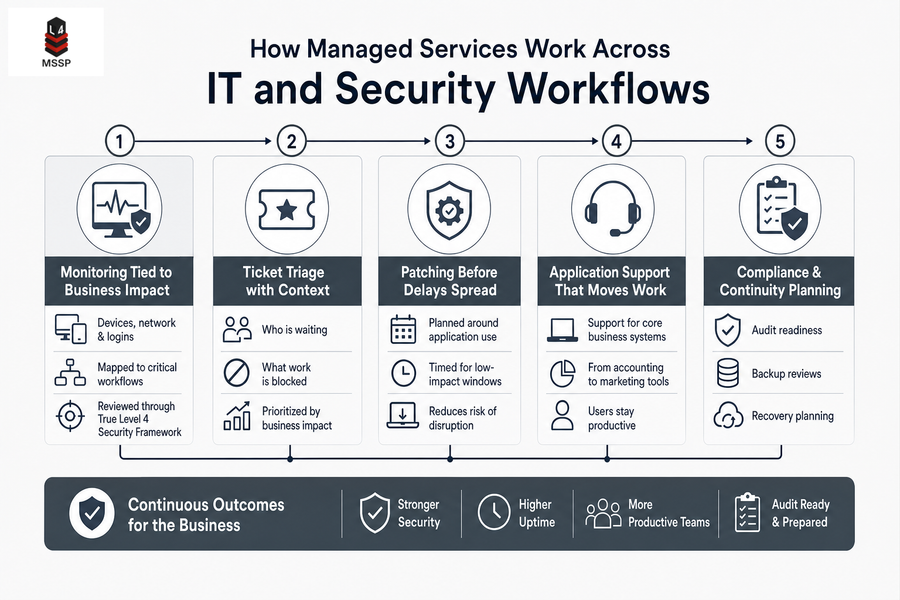
How Managed Services Work Across IT And Security Workflows
The value in how managed services work comes from coordinated execution, not isolated tools.
-
Monitoring tied to business impact: Through the True Level 4 Security Framework, device, network, and login signals are connected to the workflows they affect, such as payroll, checkout, reporting, or client delivery.
-
Ticket triage with context: A payroll issue, POS outage, or file access problem is prioritized based on who is waiting and what work is blocked.
-
Patching before delays spread: Updates are planned around application use, helping reduce interruptions during tax deadlines, retail hours, or campaign launches.
-
Application support that moves work: Managed support covers the business systems users rely on, from accounting platforms to marketing tools, so teams spend less time chasing vendors.
-
Compliance and continuity planning: MSSP One connects audit readiness, backup reviews, and recovery planning so leaders have cleaner evidence and better uptime decisions.
Make Daily IT Easier to Manage
See how Level 4 MSSP Corp can help align support, access, monitoring, and security around your daily operations.
Managed IT Services Meaning For Growth Minded Teams
The managed IT services meaning changes as the business adds people, tools, clients, locations, and reporting demands. A company that once needed password resets now needs application support, marketing systems guidance, user lifecycle management, reporting reliability, vendor coordination, compliance task tracking, and continuity planning.
The goal is efficiency without compromise: faster workflows and better margins should come with stronger security, cleaner access control, and practical recovery planning.
-
From fixes to workflows: Support shifts from resolving isolated laptop issues to keeping invoice approvals, campaign deadlines, and customer handoffs moving.
-
From accounts to lifecycle: User onboarding, role changes, and offboarding become controlled steps that protect data and reduce access gaps.
-
From tools to resilience: Reporting, backups, vendors, and compliance reviews are managed together so growth doesn’t outpace oversight.
What Is An IT Managed Services Provider For Regulated And High-Risk Work
The answer to what is an IT managed services provider changes when sensitive client files, payment systems, financial workflows, or internal IT staff are already part of the picture. A provider needs to support daily operations while strengthening risk reviews, compliance evidence, vendor handoffs, and continuity planning.
For an accounting firm, that can mean coordinating tax software access, document storage permissions, endpoint monitoring, and audit support without slowing client service. At Level 4 MSSP Corp, service can fully manage the environment or work alongside internal teams through co-managed, security-only, and compliance-focused models.
-
Fully managed operations: Support, systems, security, and recovery planning operate under one model.
-
Co-managed support: Internal IT keeps ownership where it fits, while the provider adds capacity, oversight, and security depth.
-
Security-only services: Mature teams gain advanced protection and risk visibility without replacing existing operations.
-
Compliance-focused guidance: Reviews, evidence, and risk conversations stay tied to real workflows.
What Managed Services Should Help You Do Next
Changing IT operating models takes coordination across leaders, users, vendors, and existing approval paths.
-
Map blocked workflows: Identify where tickets, access requests, application errors, or vendor delays interrupt invoices, transactions, reporting, or client delivery.
-
Review risk handoffs: Confirm that support changes include security context, compliance needs, and continuity planning before anyone adjusts permissions or systems.
-
Choose the right model: Decide whether fully managed, co-managed, or security-only support fits your team’s current responsibilities and growth plans.
What managed services should deliver is one accountable rhythm across operations, cybersecurity, compliance readiness, and continuity. If an access delay, POS interruption, or stalled campaign would put revenue or client trust at risk, contact Level 4 MSSP Corp to discuss MSSP One, its unified approach for managed IT, security oversight, compliance readiness, and business continuity. Level 4 MSSP Corp can help you choose a model that fits how your organization already works.